Invoice on credit and credit notes for bike workshops
When the bike is ready, the workshop must invoice correctly. In the Norwegian edition, Gravity Garage issues invoices on credit to business customers at pickup, credit notes and accounting export. Private customers pay in the shop’s own till system. The payment itself is not taken in Gravity Garage but in the workshop’s cash register (POS) system.
Invoice on credit at pickup
When the customer collects the bike, the program issues an invoice on credit with an invoice date, a due date and the next number in the fixed, sequential invoice number series. The number is assigned by the program, cannot be overridden and is never reused. Invoices on credit go to businesses only: the buyer’s organisation number, name and address must be on the customer card. If anything is missing, the program stops and nothing is saved. Invoices issued before 56.31 stay unchanged.
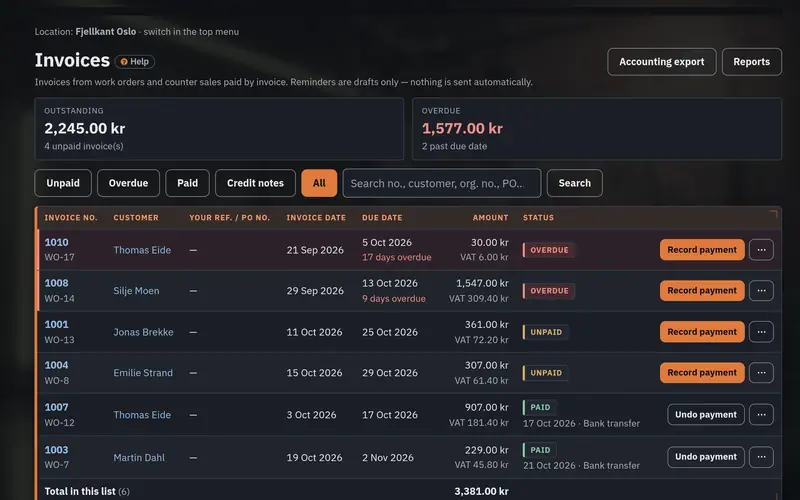
An issued invoice cannot be deleted or edited. If something must be corrected, a credit note is issued. Once the customer has paid into the workshop’s bank account, the invoice is marked as paid to account (bank) – the only payment Gravity Garage records.
Payment at the till and “Send to POS”
If the customer wants to pay at pickup, payment, receipt and the daily settlement (dagsoppgjør) happen in the workshop’s approved (product-declared) cash register system – not in Gravity Garage. If the workshop uses Zettle (PayPal Point of Sale), “Send to POS” creates a temporary product «Verksted AO-…» in the Zettle library. Open Zettle Go, search for and sell that product and take payment (the API cannot put it in a POS folder) – Gravity Garage marks the job paid automatically and deletes the product. With other POS systems, the order can be printed or exported as a file and entered in the till by hand, and the job is marked “Paid in cash register system”, with the till system and, optionally, the receipt or transaction number. Gravity Garage takes no payment and issues no receipt. We are working on integrations with more POS systems.
Older cash invoices
Cash invoices (kontantfakturaer) made in earlier versions of the program stay unchanged in the archive. They can be opened, printed and included in the accounting CSV as before, but cannot be edited or deleted. To cancel one, a credit note is issued; any refund is made in the POS system.
Invoices for business customers
- Invoice with PO number or reference, contact person, payment terms and due date. The default payment term is 14 days and can be changed per customer.
- Bank account number, and KID if you have a KID agreement with your bank. Without KID, the invoice asks the customer to use the invoice number as the payment reference.
- A list of unpaid and overdue invoices, with a reminder draft in the customer's language. The program never sends anything by itself.
- Issued invoices are fixed documents. If something must change, a credit note and a new invoice are issued.
VAT and discounts
The VAT rate and whether prices include VAT are set in the shop settings. The invoice shows VAT, and discounts are shown as original price, discount and net price. VAT is calculated on the discounted amount. The workshop's logo appears on invoices, quotes and pickup slips.
Accounting export to Excel, Fiken and Tripletex
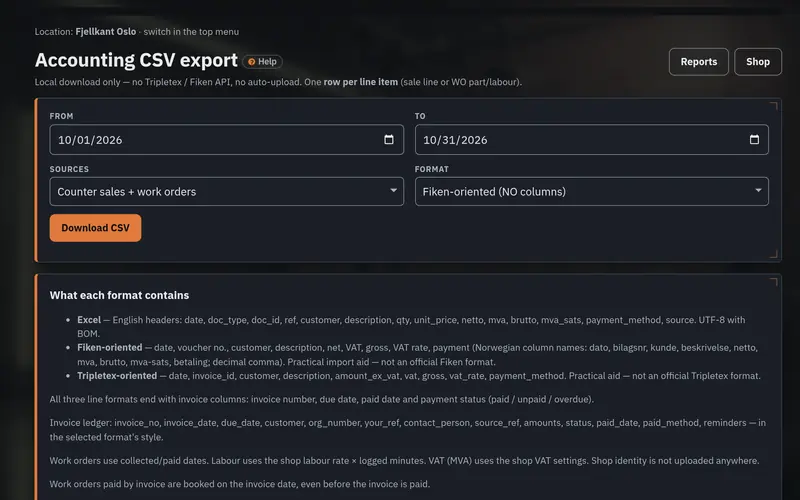
Sales, work orders and invoices can be downloaded as CSV for a chosen period, in three formats: Excel-friendly, Fiken-oriented and Tripletex-oriented. This is import help, not an official integration: nothing is sent to the accounting system, and you should check the column mapping the first time. Ask your accountant if you are unsure.
What about EHF?
Gravity Garage does not create EHF files itself today. The invoice is printed or can be saved as PDF from the print dialogue and sent by e-mail. If a customer needs EHF, it has to be handled in the workshop's accounting system – check with your accountant.
Important: Gravity Garage is not a cash register system
Gravity Garage is not a cash register system (kassasystem) and, in the Norwegian edition, does not take payments. The workshop must use a product-declared cash register system for payment, receipts and the daily settlement. This page is general information about what the program does, not accounting or legal advice – have your accountant confirm that the setup meets the requirements that apply to your business.
Next steps
See work orders for how a job moves from quote to collected, or the prices for the licence.
Try Gravity Garage as a test pilot
Before the April 2027 launch, bike workshops can get a free licence for one location. You will receive the download link and licence key by email, usually within one working day.